Lumopt Lumopt

How to Choose the Right LC Connector Transceiver in 2026?

Time:2026-09-25 Author:Madeline
0%

Choosing the right LC connector transceiver in 2026 starts with the link, not the product label. Check the switch or network card’s supported form factor, data rate, and optical interface. Then match the fiber: multimode links commonly use different wavelengths and reach limits than single-mode links. An LC connector describes the physical interface; it does not confirm that the optics will work together.

Small details matter. Confirm the required reach, wavelength, and optical budget at both ends of the link. A 10-kilometer rating, for example, is useful only when the fiber type and receiving equipment also fit the design. Check the manufacturer’s compatibility information, operating temperature, and digital diagnostics support when monitoring matters. Do not assume every transceiver with an LC port is interchangeable. Even a careful shortlist can miss host-device restrictions, and that is worth checking twice.

This guide explains how to compare specifications and avoid common selection errors. It also covers practical checks, such as verifying the module’s coding requirements and cleaning the LC connector before installation. Use the equipment vendor’s documentation and the transceiver datasheet as primary references; product listings may leave out important limits. If the documentation is unclear, confirm compatibility with the supplier before ordering. The best choice is not automatically the fastest or longest-reaching option. It is the one that meets the link’s needs, works with the host, and can be verified in the field.
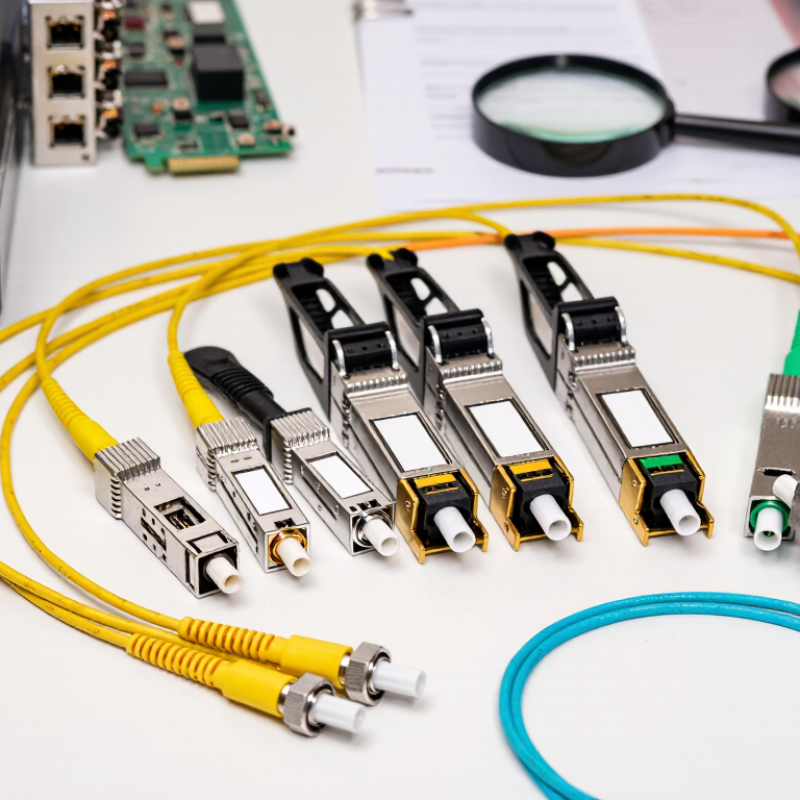
How to Choose the Right LC Connector Transceiver in 2026?

Define the Link Requirements and Operating Environment

Before selecting an LC connector transceiver, define what the link must carry and how far it must travel. Record the data rate, fiber type, required reach, and number of connections along the route. A short link inside a rack may use different optics from a long campus run. Check the equipment’s port specifications and supported transceiver types; an LC connector alone does not guarantee compatibility. Small details matter.

Map the actual operating environment, not just the ideal one. Note expected temperatures, airflow, dust exposure, vibration, and available power. In a crowded switch cabinet, restricted airflow can raise device temperatures and affect reliability. Measure the space around the port, too, because some transceiver housings may obstruct nearby connections. Allow room for cable bends. Tight turns can strain fiber and increase signal loss.

Use the fiber route and equipment documentation to confirm that wavelength, optical power, and receiver sensitivity fit the link budget. Include connector losses and any splice points, rather than relying only on a distance estimate. Where possible, validate the proposed setup with monitoring data or a link test after installation. Specifications can look reassuring on paper, yet real routes are rarely perfect. I would leave margin for aging, repairs, and future changes, while avoiding excess optical power that could exceed the receiver’s limits.

Match Fiber Type, Wavelength, and Transmission Distance

Choosing an LC connector transceiver starts with the fiber already installed. Multimode fiber commonly pairs with short-reach optics around 850 nm, while single-mode fiber typically uses wavelengths such as 1310 nm or 1550 nm. Check the cable jacket or installation records before ordering; connector shape alone does not identify fiber type. LC describes the small, push-pull connector, not the optical mode.

Distance matters just as much. A short link between switches in one rack may need a different transceiver than a campus run spanning several kilometers. Compare the module’s rated reach with the actual path, including patch panels and intermediate connections. Then check the link budget and the fiber’s loss. A nominal distance rating is not a guarantee if connectors are dirty or the route has extra splices. Small details count.

Match wavelength at both ends of the link, and confirm that each transceiver supports the intended fiber and data rate. For example, pairing an 850 nm multimode optic with a 1310 nm single-mode optic will not create a working link. It sounds obvious, yet rushed upgrades can miss this. Also verify device compatibility and temperature requirements, especially in dense cabinets. Clean LC ferrules before insertion; dust is easy to overlook. I still recommend checking the exact model documentation, because naming conventions and supported reaches can vary. A little caution saves a lot of troubleshooting.

Check LC Connector Compatibility and Optical Specifications

How to Choose the Right LC Connector Transceiver in 2026?

Check LC Connector Compatibility and Optical Specifications

An LC plug may fit the port and still deliver the wrong link. Check whether the equipment requires single-mode or multimode fiber, and confirm duplex or simplex operation. Also verify the transceiver’s wavelength, data rate, and supported reach against the cable and the equipment specifications. Small details matter: a yellow single-mode patch cord is not interchangeable with an aqua multimode cord just because both use LC connectors.

Use published standards as a practical reference. IEEE 802.3 specifies 10GBASE-LR for links up to 10 km over single-mode fiber, while 10GBASE-SR supports shorter multimode links, including up to 400 m on OM4. These figures are limits under specified conditions, not a promise that every installed link will perform identically. Measure the actual path, including patch panels. Then compare its loss with the transceiver’s optical power budget, and check receive-power limits as well.

Easy to overlook.

The Ethernet Alliance’s Ethernet Roadmap tracks higher-speed generations, including 400GbE and 800GbE, but speed alone does not establish compatibility. Read the module data sheet for connector type, wavelength, fiber category, reach, and temperature range. Check host-device support, too; a physically compatible module may not be validated by the system. I’d verify both ends and test the finished link.

Spec sheets can be oddly optimistic.

Verify Data Rate, Standards, and Equipment Compatibility

How to Choose the Right LC Connector Transceiver in 2026?

Verify Data Rate, Standards, and Equipment Compatibility

An LC connector only describes the fiber interface; it does not guarantee that a transceiver will work in your equipment. Check the required link speed, fiber type, wavelength, reach, and port standard before ordering. A 10GBASE-SR module, for example, is designed for multimode fiber, while a 10GBASE-LR link typically uses single-mode fiber. Match both ends of the link, and confirm the switch or server supports the module’s speed and optical specification. Small details matter. A duplex LC plug can fit physically while the optics remain incompatible.

Use published standards and roadmaps to check where a network is headed. The Ethernet Alliance’s 2024 Ethernet Roadmap includes 400GbE, 800GbE, and 1.6TbE technologies, illustrating how quickly data-rate requirements are advancing. IEEE 802.3 specifications define Ethernet physical-layer requirements; consult the relevant clause or equipment documentation rather than relying on a seller’s headline speed. Check supported module coding, power limits, and firmware requirements, too. For a live installation, verify the link with the device’s diagnostics and inspect optical levels at both ends. Clean the LC end faces before testing. Dust is easy to overlook. I have seen compatibility checks stop at connector shape, which is understandable but incomplete; a short test on the actual equipment can expose surprises before deployment.

Compare Power, Reliability, and Lifecycle Requirements

Power, Reliability, and Lifecycle in LC Transceiver Selection

Start with the link, not the module. Record the fiber type, required distance, data rate, and equipment compatibility. Then compare the transceiver’s transmit power and receiver sensitivity with the link’s optical budget. A short office link and a long fiber run do not need the same reach. Extra reach can add cost and power without improving performance. Check connector cleanliness, too. A small dust speck on an LC end face can cause errors that look like a failing module.

Power matters in dense racks. A few watts per port may seem minor, but dozens of ports add heat and strain cooling capacity. Review the device’s stated power draw and confirm airflow direction matches the chassis. Reliability also depends on operating temperature, diagnostic monitoring, and stable operation under expected loads. Monitoring can reveal rising temperatures or falling receive power before users notice an outage. Useful, but not magic.

Think beyond purchase day. Verify that replacement units will remain available, and ask how firmware, coding, and interoperability are handled across your equipment. Keep compatible spares where downtime is costly. A cheaper transceiver may be a poor bargain if testing or replacement takes days. Yet paying for every premium feature can waste budget. The uncomfortable part: lifecycle plans are often guesses. Revisit them when network demand, rack density, or support needs change.

FAQS

What should I check before choosing an LC transceiver?

Record the data rate, fiber type, required reach, and connections along the route. Port fit alone proves little.

How do I match a transceiver to the installed fiber?

Multimode fiber commonly uses short-reach optics near 850 nm. Single-mode fiber often uses 1310 nm or 1550 nm optics. Check cable labels or installation records; LC shape does not identify fiber type.

Why must both ends use matching wavelengths?

Each end must support the intended fiber, wavelength, and data rate. An 850 nm multimode optic will not pair correctly with a 1310 nm single-mode optic. Easy to miss during rushed upgrades.

How should I estimate the required reach?

Measure the real route, including patch panels, splices, and other connections. Compare its loss with the transceiver’s optical budget. A rated distance is not a guarantee.

Does an LC connector guarantee equipment compatibility?

No. Check duplex or simplex operation, fiber type, wavelength, data rate, and supported reach. Confirm the host equipment supports the specific module, too.

What environmental details can affect performance?

Check temperature, airflow, dust, vibration, and available power. A crowded cabinet can trap heat. Leave space for nearby ports and gentle cable bends.

What should I verify after installation?

Clean the LC ferrules, then test the link or review monitoring data. Dust matters. Check receive power as well as optical loss; I may be overly cautious, but paper specifications can look reassuring.

How can I allow for future changes?

Leave reasonable margin for aging, repairs, and route changes. Avoid excess optical power, which may exceed the receiver’s limits. More margin is not always better.

Conclusion

Choosing the right LC connector transceiver in 2026 starts with understanding the link requirements and operating environment. Consider the required bandwidth, the distance between devices, and conditions such as temperature or limited space. Then match the transceiver to the installed fiber type, wavelength, and transmission distance to help ensure a suitable optical link. Confirm that its LC connector matches the cabling and that its optical specifications meet the needs of the connection.

Next, verify the data rate, supported standards, and compatibility with the equipment at both ends of the link. Compare power use, reliability expectations, and lifecycle requirements as well, including how easy the unit will be to maintain or replace. Taking these factors together helps narrow the options and select an LC connector transceiver that fits the network’s current needs while allowing for practical future changes.

Madeline

Madeline

Madeline is a dedicated marketing professional with a wealth of expertise in our company's core offerings. With a keen understanding of the industry, she brings a unique perspective to her role, consistently delivering high-quality content that highlights the superior aspects of our products. As......